---
title: Keep records
description: A record is one line in a document with a type and a status, such as a decision, a task or a piece of knowledge. Add records, change their status and find them later.
url: https://docs.thegram.one/use/records/
lang: en
tier: current
---
# Keep records
In this chapter: what records are (the thing that makes Thegram more than a document store), and how to keep and find them.
## What a record is {#what}
If your meeting notes say "The official launch is in the first week of December", a person can read it. But three months later, to answer "when did we decide to launch?", someone has to go through the notes again.
A **record** puts a label on that line: "this is a decision, and its status is accepted". With the label, both people and AIs can pick out and count "accepted decisions only" or "blocked tasks only".
## Record types {#types}
These are the common ones.
| Type | What it holds | Example |
| --- | --- | --- |
| **Decision** | Something that was decided | Official launch in the first week of December |
| **Task** | Work to do | Finish the payment screen |
| **Knowledge** | A fact you learned | The launch covers documents, search and sharing |
| **Goal** | A state or number to reach | 1,000 sign-ups this quarter |
| **Metric** | A value that was actually measured | 212 sign-ups this week |
| **Risk** | Something that could go wrong | Legal review may be late |
| **Evidence** | Material that backs a judgment | Beta user survey results |
| **Schedule** | Something with a set date | Final check at the end of November |
There are also Event, Person, Assumption, Source, History, Note and Project.
Goal and metric are easy to confuse. "Let's reach 1,000" is a goal. "We are at 212" is a metric.
## See records {#see}
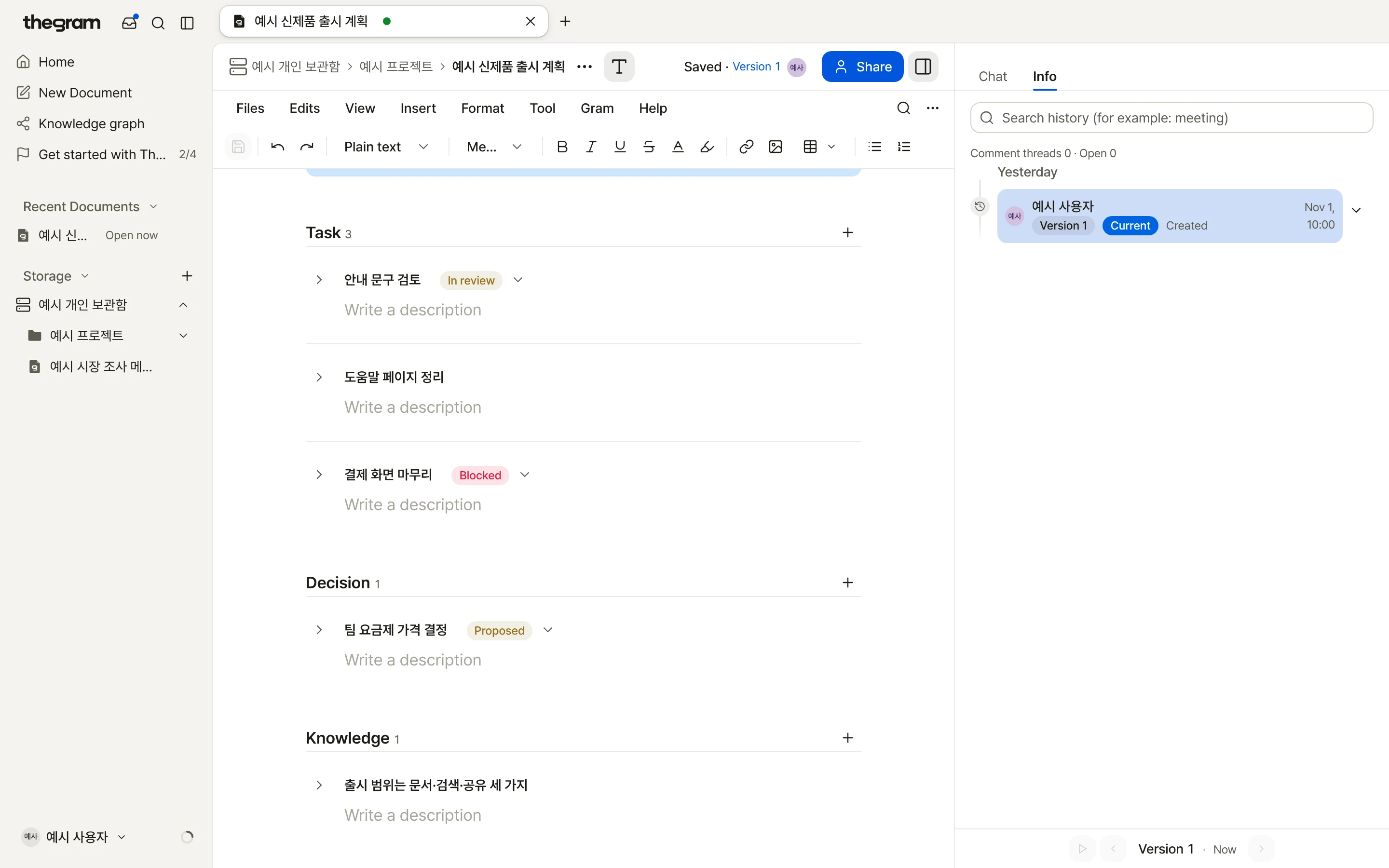
Open a Gram document and scroll below the body to the **Records** list. It groups the records in this document by type.
The records list. Each type has an add button (+) on its right.
- The colored text next to a name is its **status**: Open, In review or Blocked for a task, Proposed or Accepted for a decision.
- Select the arrow on the left of a name to open its description and what changed.
- Records can also sit in the body as a table. Each row of the table is one record.
## Add a record {#add}
1. In the records list, select **+** on the right of the type to add (for example Decision).
2. Enter a name and press Enter. Press Esc to cancel.
3. Under the name, in "Write a description", write the reason or background.
4. Select the status and choose the right value.
For a decision, write **why** it was decided in the description. The reason is what people look for most later.
## Edit and delete records {#edit}
- Select the name, description or status in place to change it. The change is kept as a new version of the document.
- Deleting a record removes it from the current document only. It remains in earlier versions, where you can see it in the [version history](/manage/history/).
- When a decision changes, change its status and add the new decision instead of deleting the old one. That keeps "why it changed".
## Records your AI writes {#ai}
An AI with the [instructions](/start/instructions/) writes what was decided in a conversation as records like these. So decisions and tasks build up in your storage without you creating each record. You edit and delete records an AI wrote the same way. [Let your AI save](/use/ai-save/)
## Find records {#find}
| Where | How |
| --- | --- |
| In this document | Type a word in the search field of the **Info** tab on the right |
| In every storage | Type a word in search at the top (Ctrl+K). Records appear under **In the text** with their type |
| Through a connected AI | Ask something like "find accepted decisions only, with their evidence". [Ask your connected AI](/use/recall/) |
| As a map | See how documents and records connect in the [knowledge graph](/use/home/#graph) |
## If you are stuck {#help}
- **There is no records list.** The records list is in Gram documents. For an uploaded PDF or Office file, switch to the **Gram** view at the top right to see the records drawn from that file.
- **+ does not respond.** Your role is Viewer, or you are reading an earlier version.
Next chapter: [Let your AI save](/use/ai-save/)