---
title: Ask Gram AI in a document
description: Gram AI is the AI built into Thegram. Ask about a document from the Chat tab on its right, and learn how it differs from an AI you connected.
url: https://docs.thegram.one/use/gram-ai/
lang: en
tier: current
---
# Ask Gram AI in a document
In this chapter: ask the AI about a document while it is open. There is nothing to connect.
## Gram AI and a connected AI are different {#difference}
There are two ways to meet an AI in Thegram.
| | Gram AI | A connected AI |
| --- | --- | --- |
| Where it is | The **Chat** tab on the right of a Thegram document | Your own AI, such as ChatGPT, Claude or Claude Code |
| What it reads | **Only the document** you have open | The storages you gave it permission for |
| What you prepare | Nothing | A [connection](/start/connect/) and [permissions](/access/permissions/) |
| Use it to | Summarize a long document, find the decisions in it, tighten a sentence | Ask across many documents, record a conversation |
For questions across documents, see [Ask your connected AI](/use/recall/).
## Steps {#steps}
1. Open a document.
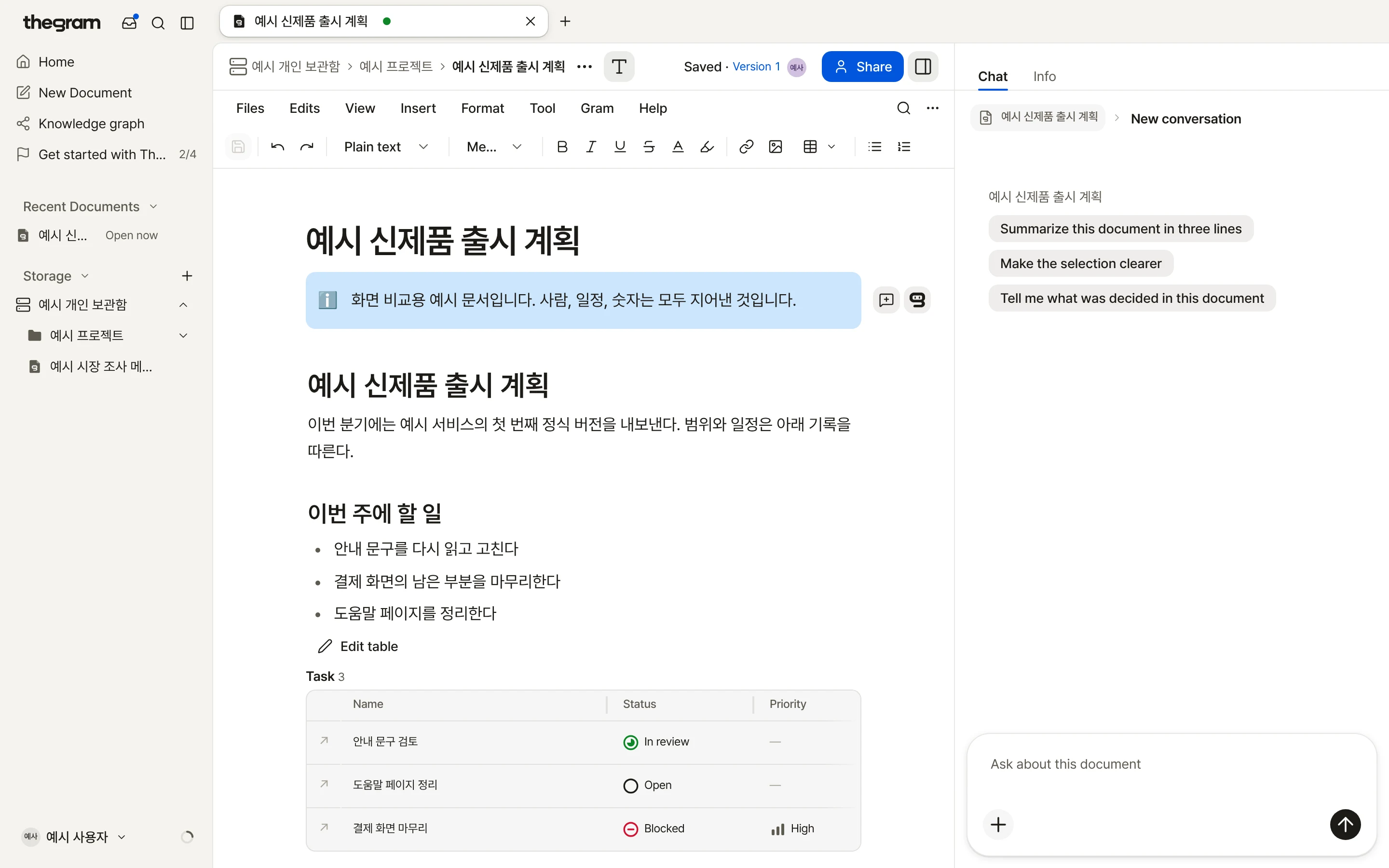
2. Select the **Chat** tab in the right panel. If the panel is closed, select the panel icon at the top right.
3. Type a question in the field at the bottom and send it. At first you can select one of the suggested questions.
The Chat tab, with three suggested questions and the input field.
The three suggested questions are:
- Summarize this document in three lines
- Make the selection clearer
- Tell me what was decided in this document
Use **+** in the input field to attach a picture or a text file to your question.
## Ask inside the body {#inline}
- Press `/` on an empty line of the body and choose **Gram AI** at the top to ask right inside the document.
- Select some text first and the answer is about that selection.
- In a comment reply, you can also call it with `@Gram`.
## Good to know {#notes}
- Gram AI reads **only this document**. Ask as if it knows nothing about your other documents.
- Asking Gram AI counts against **this week's AI limit**. See what is left in **Settings › Plan and usage**. [Plan and usage](/manage/plan/)
- An AI's answer can be wrong. Check numbers and decisions against the body.
## If you are stuck {#help}
- **You see "This week's AI limit was reached, so there was no answer".** Wait for the limit to reset, or buy extra usage in Settings › Plan and usage.
- **There is no Chat tab.** The right panel is closed. Select the panel icon at the top right.
- **It can't answer in an organization document.** When that storage's **AI access** is off, Gram AI cannot read the storage either. An organization owner or admin can turn it on.
Next chapter: [Ask your connected AI](/use/recall/)